How to Check If Your Data Was Breached — Free with HIBP and HPI

Credential leaks are not an edge case anymore — they’re a baseline assumption. Services get breached, dumps get aggregated and replayed, and the realistic question is no longer if one of your addresses appears in a breach corpus, but which and what was exposed. You don’t need a paid “dark web monitoring” product to answer that. Two free, independent services cover it well: Have I Been Pwned (HIBP) and the Identity Leak Checker from the Hasso-Plattner-Institut (HPI).
I run both — HIBP for continuous monitoring, HPI as a second data set — and I recommend them over the bundled “dark web reports” of large platforms, which mostly exist to drive you toward a subscription.
What these tools actually check
A quick note on terminology, because it gets misused. The surface web is what search engines index. The deep web is everything behind auth or otherwise unindexed (mailboxes, banking, intranets). The dark web is a small subset reachable only via overlay networks like Tor, and it’s one of several places stolen credentials get traded.
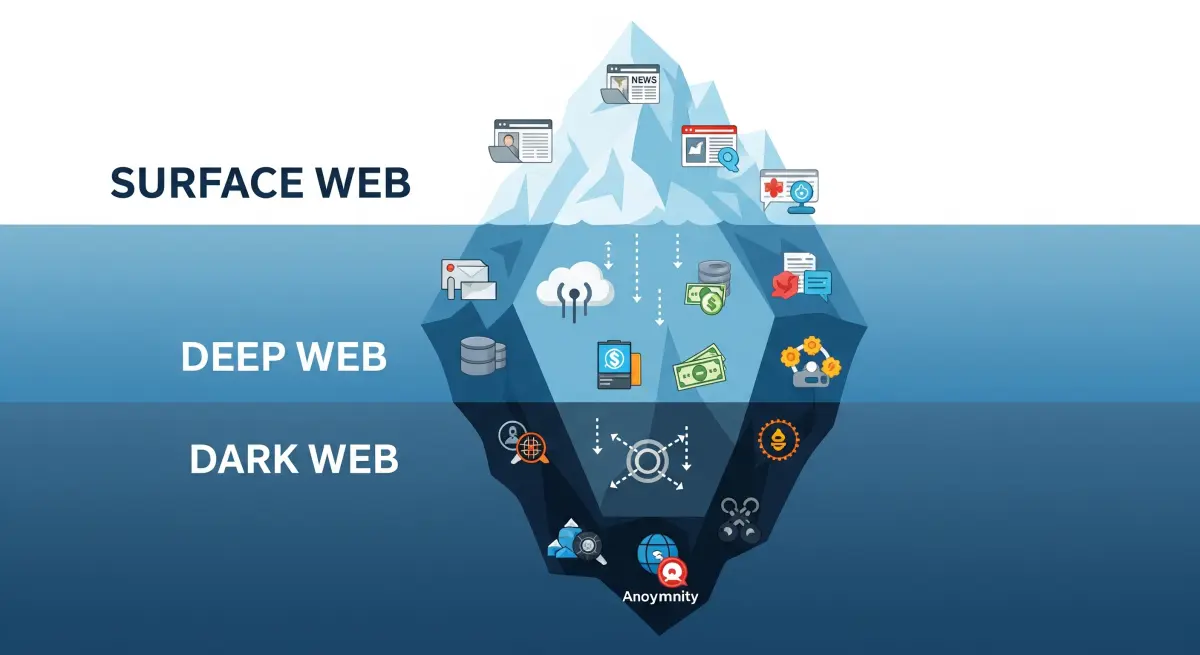
You can’t meaningfully “search the dark web” for yourself, and you shouldn’t try. What these services do is more useful: they ingest known breach dumps and credential collections into a searchable corpus, and let you match your identifiers against it. The result tells you which breaches you’re in and which data classes were exposed — enough to prioritise remediation.
The two tools
Have I Been Pwned (HIBP)
HIBP, maintained by Troy Hunt, is the de-facto reference for breach lookups: roughly 15 billion accounts from 900+ breaches, with a clean API and sensible privacy engineering.
Checking an address
Query the address
Enter your email at haveibeenpwned.com. Results render immediately, in-page — no signup.
Read the breach list
Each hit shows the breach name, date, and exposed data classes (email, password, phone, address, etc.). The data classes are what you act on — a leaked password is a different priority than a leaked marketing record.
The parts worth knowing
- Pwned Passwords — check whether a password hash appears in known dumps. It uses k-anonymity: the client sends only the first five characters of the SHA-1 hash, so the full password or hash never leaves your machine. Most password managers (1Password, Bitwarden, KeePassXC plugins) wire this in directly.
- Notify me — register an address once and HIBP emails you when it shows up in a future breach. This is the difference between a one-off check and actual monitoring; set it and forget it.
- Domain search — verify a domain and monitor every address under it. Practical for a family domain or a small org, and scriptable against the API.
HPI Identity Leak Checker
The Identity Leak Checker is run by the Hasso-Plattner-Institut in Potsdam. It has operated since 2014, matches against 13+ billion leaked identity records, and — usefully — also reports exposed linked PII: phone numbers, dates of birth, postal addresses, not just credentials.
Checking an address
Submit the address
Enter your email at sec.hpi.de/ilc.
Receive the report by email
HPI does not display results in the browser. It mails a colour-coded report to the address you queried. That’s a deliberate design choice: it proves control of the mailbox and prevents anyone from probing a third party’s address.
Why I keep it in the rotation
- Independent and academic, operating under EU/GDPR rules.
- Queried addresses aren’t retained or reused beyond the immediate lookup.
- The PII-category breakdown helps you gauge severity — a leaked birth date plus address is identity-theft fuel, not just spam risk.
HIBP vs. HPI
They overlap but aren’t identical, so I use both. The trade-offs:
| Have I Been Pwned | HPI Identity Leak Checker | |
|---|---|---|
| Operator | Troy Hunt (independent) | Hasso-Plattner-Institut (academic, DE) |
| Delivery | In-page, instant | Emailed to the queried address |
| Scope | Credentials + exposed fields | Email + linked PII |
| Password check | Yes (k-anonymity) | No |
| Continuous alerts | Yes (free) | No (one-off) |
| API | Yes | No |
| Account | No | No |
| Cost | Free | Free |
Remediation workflow
A hit isn’t cause for alarm; it’s a work item. Process it in order of impact:
    flowchart TD
    A[Query email in HIBP + HPI] --> B{Any hits?}
    B -->|No| C[Enable HIBP alerts<br/>re-check periodically]
    B -->|Yes| D[Rotate the exposed password]
    D --> E[Enforce unique passwords<br/>via a password manager]
    E --> F[Add 2FA / passkeys<br/>on critical accounts]
    F --> G[Watch for phishing<br/>review statements]
Rotate the exposed credential
Change it on the breached service first. If that password was reused anywhere, rotate it there too — reuse is what makes credential stuffing work, and automated attacks will try the pair across hundreds of sites.
Move to unique passwords with a manager
Per-service unique passwords are only realistic with a password manager. Let it generate and store them; you maintain one strong master secret. This single change neutralises credential stuffing entirely.
Add a second factor
With 2FA or passkeys, a leaked password alone is not enough to authenticate. Prefer an authenticator app or passkeys over SMS. Prioritise the accounts that gate everything else: email first, then identity providers, banking, and finance.
Assume targeted phishing
A leaked address tends to attract more convincing phishing, often referencing the breach itself. Treat unsolicited “secure your account” messages as suspect and navigate to services directly rather than via links.
Monitor and, if needed, lock down credit
Review bank and card statements for anomalies. If sensitive financial identifiers were exposed, consider a credit lock where available (e.g. a SCHUFA-related lock in Germany).
Bottom line
Run both HIBP and the HPI Identity Leak Checker, enable HIBP’s free alerts, and standardise on unique passwords plus a second factor. Breaches will keep happening upstream; with a few minutes of setup, they stop translating into account compromise on your side.